Isostack Tool Help – Right Panel
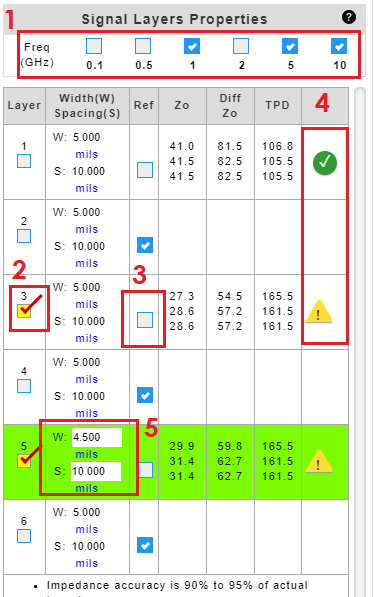
  1. Check to select frequencies to calculate impedance.
  2. Check to highlight the copper layer of interest.
  3. Uncheck reference check box to designate a signal layer. By default, all layers are treated as a reference plane.
  4. 4. A ‘green’ Okcheck mark indicates that the input criteria meet the constraints for the equations used in IsoStack. A ‘yellow’ Warning warning sign indicates that the input criteria do not meet the constraints for the equations used in IsoStack. Click on the icon to reveal the parameters and criteria.
  5. Click to enter or edit trace properties.
NOTE:
Formulas from IPC-2141A Design Guide for High-Speed Controlled Impedance Circuit Board.

16 July 2021

Related Posts

Isola DesignCon 2023
Isola Shows Halogen-Free PCBs at DesignCon 2023
Isola Group, a global leader in advanced circuit materials for printed-circuit boards (PCBs), is inviting exhibition visitors to learn more about halogen-free PCBs at DesignCon 2023. Visitors to Isola’s exhibition Booth 627 can discover how unmatched levels of electrical performance are possible with a…
Travis Interview
PCB007 Interview with Travis Kelly: Maintaining Continuity of Supply
On April 9, Barry Matties spoke with Travis Kelly, Isola president and CEO. Travis gave an update on Isola’s responses to the COVID-19 challenges in materials manufacturing. Travis discusses how Isola is managing their supply chain by leveraging our global footprint to to fulfill increasing demand. The audio and…
Isola at IPC APEX EXPO and DesignCon Conferences Jan. 29 – 31