Isostack Tool Help – Right Panel
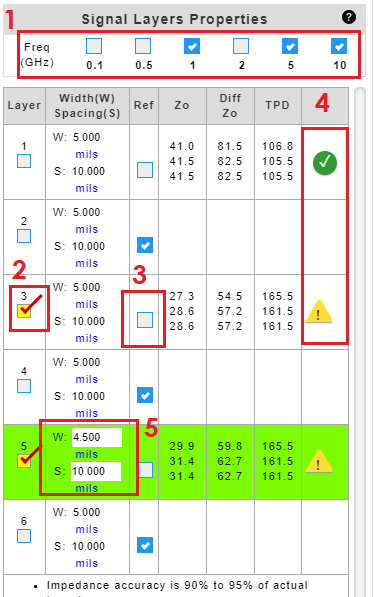
  1. Check to select frequencies to calculate impedance.
  2. Check to highlight the copper layer of interest.
  3. Uncheck reference check box to designate a signal layer. By default, all layers are treated as a reference plane.
  4. 4. A ‘green’ Okcheck mark indicates that the input criteria meet the constraints for the equations used in IsoStack. A ‘yellow’ Warning warning sign indicates that the input criteria do not meet the constraints for the equations used in IsoStack. Click on the icon to reveal the parameters and criteria.
  5. Click to enter or edit trace properties.
NOTE:
Formulas from IPC-2141A Design Guide for High-Speed Controlled Impedance Circuit Board.

16 July 2021

Related Posts

Signal Integrity Logo (1)
Jeff Waters Interviewed by Signal Integrity
Signal Integrity Journal recently caught up with Jeff Waters to check in on his progress over the last two years since he took over as president and CEO of Isola Group discussing improvements in their operations and new products.
5G Suitable Laminate and Prepreg Materials | Isola Groupcement
Isola’s Role in the Deployment of 5G
By now just about everyone has heard about 5G in commercials or on billboards but you may be wondering what it means for printed circuit boards and the materials available from Isola?   5G stands for the 5th generation wireless standard. 5G brings brings faster mobile internet speeds to market…
Mg Pcb007 Interview Isola Release of IS550H
Isola Releases IS550H Material: Interview with Experts
Interview by Nolan Johnson Nolan Johnson speaks with Michael Gay of Isola and Chris Hunrath of Insulectro about the release of their new halogen-free, high-thermal reliability material, which they hope fills the gap in the market between epoxies and polyimides.   Nolan Johnson: I understand there’s something new…